Struggling to remember English grammar rules? You are not alone. Traditional grammar books are overwhelming, apps are expensive and rigid, and notes scattered across your phone never get reviewed. Notion fixes all three problems by giving you one free, customizable place to learn, practice, and track grammar — and to actually see yourself improving.
This guide walks you through building a complete grammar system from scratch. By the end you will have a dashboard with a rules database, a practice tracker, and a mistake log, plus a daily routine to run it.
Why Notion for English Grammar
Before the setup, it is worth understanding why Notion beats a notebook or a generic app:
- One hub. Rules, exercises, examples, and resources live together instead of being scattered.
- Visual progress. Filtered views and counts let you see what you have mastered and what still needs work.
- Customizable. You build it around your weaknesses, not a course author's curriculum.
- Free and cross-device. Study on your laptop, review on your phone, no subscription.
The payoff is not the tool itself — it is that a system you can see makes you keep going.
Step 1: Create Your Grammar Dashboard
Start with a single page called Grammar Hub. This is your home base. Add a short header, then leave room to embed the databases you are about to create. Keep it minimal — a heading, a callout with your current focus, and links to your three databases. Resist decorating it; a clean dashboard is one you will open daily.
Step 2: Build Your Grammar Rules Database
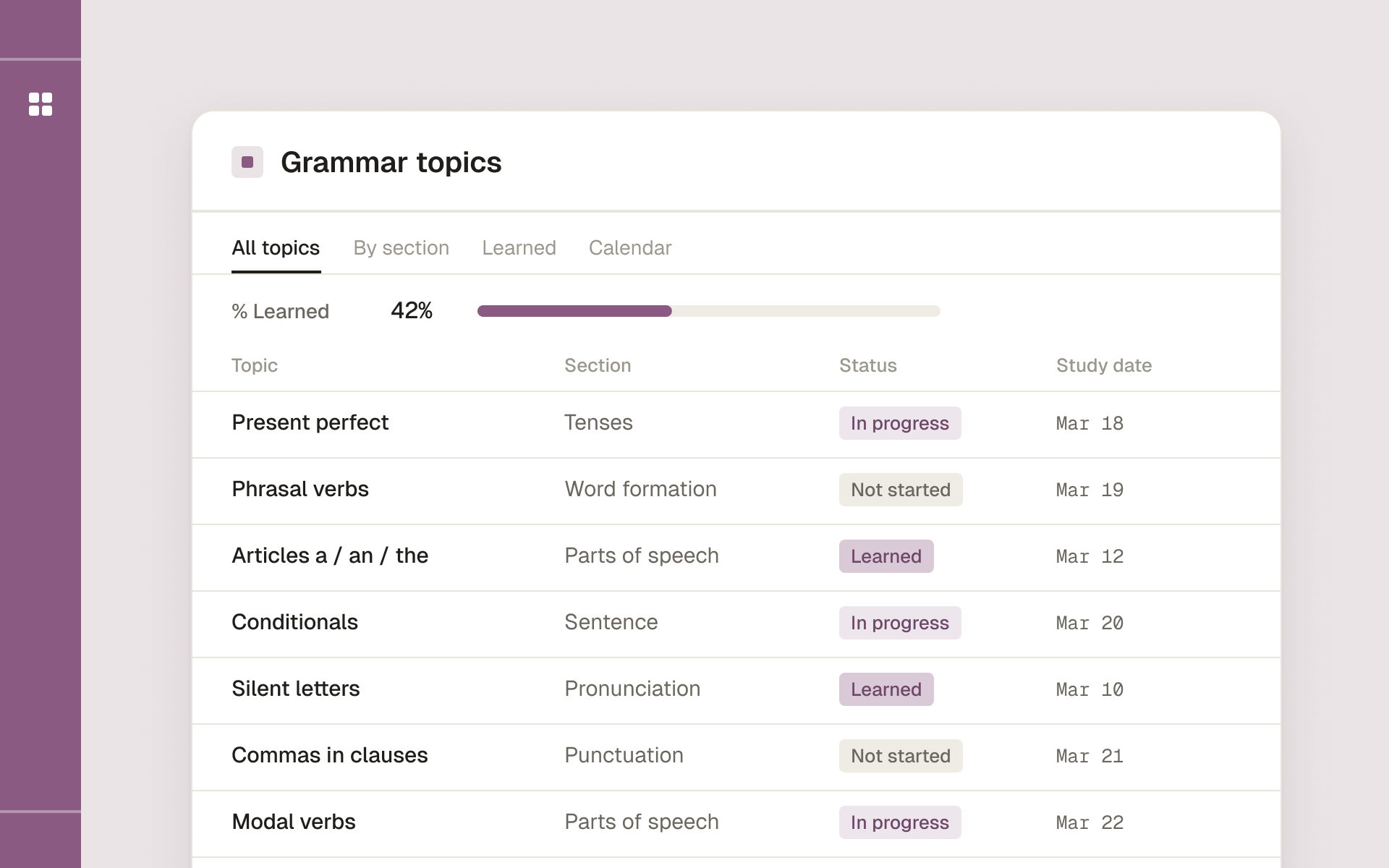
This is the core of the system. Create a new database called Grammar Rules with these properties:
- Rule Name (title) — e.g. "Present Perfect vs. Past Simple"
- Category (select) — Tenses, Articles, Prepositions, Conditionals, Confusing Pairs
- Difficulty (select) — Easy, Medium, Hard
- Status (select) — Learning, Reviewing, Mastered
- Examples (text) — two or three correct sentences
- Common Mistake (text) — the wrong version you tend to make
- Next Review (date) — for spaced repetition
Seed it with 10–15 rules to start. Do not add 100 at once — an overwhelming database is one you abandon. Begin with the rules you know you struggle with: conditionals, articles, the present perfect.
Create two views on this database:
- A board grouped by Status so you can drag rules from Learning to Reviewing to Mastered.
- A filtered table showing only rules where Next Review is on or before today — your daily review queue.
Step 3: Add a Practice Tracker
Learning a rule is not the same as using it. Create a second database called Practice Log to record actual application:
- Date (date)
- Activity (select) — Exercises, Writing, Speaking, Reading
- Linked Rule (relation to Grammar Rules)
- Score / Notes (text) — how many you got right, what felt hard
The relation property is the key move: linking each practice entry to a rule means you can open any rule and instantly see every time you practiced it and how you did. Over weeks, this becomes a record of genuine progress rather than vague effort.
Step 4: Create a Mistake Tracker
Your own mistakes are the most valuable study material you have — far better than generic exercises. Create a Mistake Log database:
- Mistake (title) — what you wrote or said
- Correct Version (text)
- Grammar Rule (relation to Grammar Rules)
- Context (text) — where it happened: email, conversation, essay
Every time you catch an error — in your own writing, in feedback from a tutor, in a corrected exercise — log it. Then review this database weekly. Patterns emerge fast: you will see the same three or four rules generating most of your errors, and those become your priorities.
Step 5: Connect Everything
The relations are what make this a system instead of three separate lists. From any rule, you can see its practice history and every mistake tied to it. From the dashboard, embed:
- The review queue (rules due today)
- A recent mistakes view (last 7 days)
- Your status board so progress is visible at a glance
Open the dashboard and the whole picture is in front of you.
Your Daily Routine
A system only works if you run it. Here is a realistic daily loop, about 30 minutes total:
- Morning (10 min): Open the review queue. Read through the rules due today and their examples.
- Afternoon (15 min): Do focused practice — exercises or a short paragraph using today's rules — and log it in the Practice Log.
- Evening (5 min): Log any mistakes you noticed during the day in the Mistake Log.
Once a week, do a longer review: scan the Mistake Log for patterns, move mastered rules on the board, and reset the Next Review dates. Rules you got right easily move further out; rules you missed reset to tomorrow.
Advanced Tips
Once the basics are running, layer on power features:
- Notion AI for explanations. Ask it to explain a rule in simpler terms or generate practice sentences, then paste the best into your rule entry.
- Custom study-mode views. Make a view filtered to only Hard difficulty for intensive sessions, and a quick "five-minute review" view of random Mastered rules to keep them fresh.
- Spaced repetition by date. The Next Review date property is a lightweight spaced-repetition engine. Trust it and review what it surfaces.
- Share with a tutor. Give a tutor view access to your Mistake Log so lessons target your real gaps.
Common Mistakes to Avoid
- Overcomplicating the build. Three databases and a few views are enough. Do not spend your study time decorating.
- Starting with too many rules. Begin with 10–15. Add as you master them.
- Collecting without using. A beautiful resource library you never open teaches nothing. Practice beats hoarding.
- Skipping review. Consistency beats intensity. Ten minutes daily outperforms three hours on Sunday.
Start Today
You do not need to build the whole thing at once. Create the Grammar Rules database, add ten rules you struggle with, and set up the review queue. That alone puts you ahead of most learners. Add the practice and mistake logs once the rules database is part of your routine.
The magic is not in Notion — it is in finally having a system you can see, measure, and stick with. Build the simple version this week, run the daily loop, and let your own mistake log tell you what to study next.
Study English grammar topic by topic, with exercises and answer keys, and track what you have learned.