
The right Notion template for learning English depends on what you are missing. If you need a plan and motivation, a free hub from Notion's Marketplace is enough. If you need a structured path through grammar, use a grammar planner. And if your real problem is forgetting words, a flashcard app like Anki will do more for you than any Notion page.
What Notion does well for English — and what it doesn't
Notion is a flexible notebook with databases. For a language learner that makes it good at three jobs:
- Planning. A date property plus a calendar view tells you what you study on which day.
- Structuring knowledge. Grammar topics, your own notes and example sentences live in pages you can link, filter and search.
- Tracking. A status property and a progress bar show what you have covered.
What Notion does not do out of the box is schedule reviews for you. There is no built-in spaced-repetition engine that decides when you should see a word again. You can approximate it with a «next review» date and a filtered view, but you have to maintain it by hand. Anki does this natively: you rate how well you remembered a card, and it schedules the next review for when you are likely to forget. It is free on desktop and Android, and its newer FSRS scheduler is supported across Anki, AnkiMobile, AnkiWeb and AnkiDroid.
So a sensible split looks like this: Notion for the plan, the grammar and your mistakes; Anki for vocabulary recall; real conversations and listening for everything else.

The options, compared honestly
Every template below was opened and checked. The free ones come from Notion's own Marketplace; the paid ones are ours, and we say where they fall short.
| Option | Price | What's inside | Best for | Skip it if |
|---|---|---|---|---|
| Free · Notion Marketplace | ||||
| Student Starter Pack by Notion · Notion Marketplace | Free | All-in-one planner for tasks, assignments and deadlines, plus habit, budget and job-application trackers | Students who need one planner for classes, including an English course | You want anything English-specific — it has no language content |
| English Learning Hub by Hailey Do · Notion Marketplace | Free | Level-test links, goal tracker, a 6-month weekly plan, daily checklist, skills check-in database, resource library | Intermediate learners aiming at fluency with 1.5–2 hours a day | You are a beginner, or you have 20 minutes a day |
| Language Learning by Fronk · Notion Marketplace | Free | Languages database (all languages / by level) with sections for words and phrases, culture, weekly challenges and resources | People learning English alongside another language | You only want grammar structure |
| Learning IELTS by Bennk · Notion Marketplace | Free | Study prompts and tips for all four IELTS sections | Anyone with an IELTS date | You are not taking an exam |
| Paid · ours | ||||
| English Grammar Study Planner by AIkits · aikits.org | $9 | 7 grammar sections with 50+ lesson pages (theory, examples, exercises, answers hidden in a toggle on most); status, progress and study-date tracking | Self-taught learners who want a full grammar path with practice built in | Your grammar is already solid, or you only need vocabulary |
| Any language Grammar Tree by AIkits · aikits.org | $5 | An empty grammar skeleton in the same 7 sections, with levels, «study before / after» links and table, gallery and calendar views | Teachers, polyglots, anyone filling in their own notes for any language | You want ready-written explanations |
| Flashcards | ||||
| Anki apps.ankiweb.net | Freedesktop, Android, web; paid iOS app | Flashcards with automatic spaced-repetition scheduling | Vocabulary, phrasal verbs, irregular forms | You want to plan or take notes |
Free options worth your time
Notion's Student Starter Pack is Notion's own student toolkit: an all-in-one planner for to-dos, assignments and deadlines, plus habit, budget and job-application trackers. Well built and free, but it knows nothing about English. Use it if English is one of several subjects and you want one planner for all of them.
English Learning Hub by Hailey Do is the most English-specific free template we found. It opens with links to level tests (Cambridge and others), then a goal tracker, a detailed 6-month week-by-week plan across speaking, listening, vocabulary, writing and grammar, a daily checklist, a database for regular skill check-ins and a resource library. The plan is ambitious — it assumes 1.5 to 2 hours a day and targets C-level English — so treat it as a menu rather than a contract.
Language Learning by Fronk is built for several languages at once: each language is an entry, viewable by level, with sections for words and phrases, culture, weekly challenges and resources. The listing says it includes flashcards with a spaced-repetition system and 52 weekly challenges. A good pick if English is one of two or three languages you are juggling.
Learning IELTS by Bennk is narrow on purpose: prompts and tips for the Listening, Reading, Writing and Speaking sections. With a test date, start here and add grammar work only for the weak spots your practice tests reveal.
Paid options (ours) and who they are for
We make two grammar templates. Neither replaces a teacher, a flashcard app or real conversation. They give grammar a clear order and a place to practise.
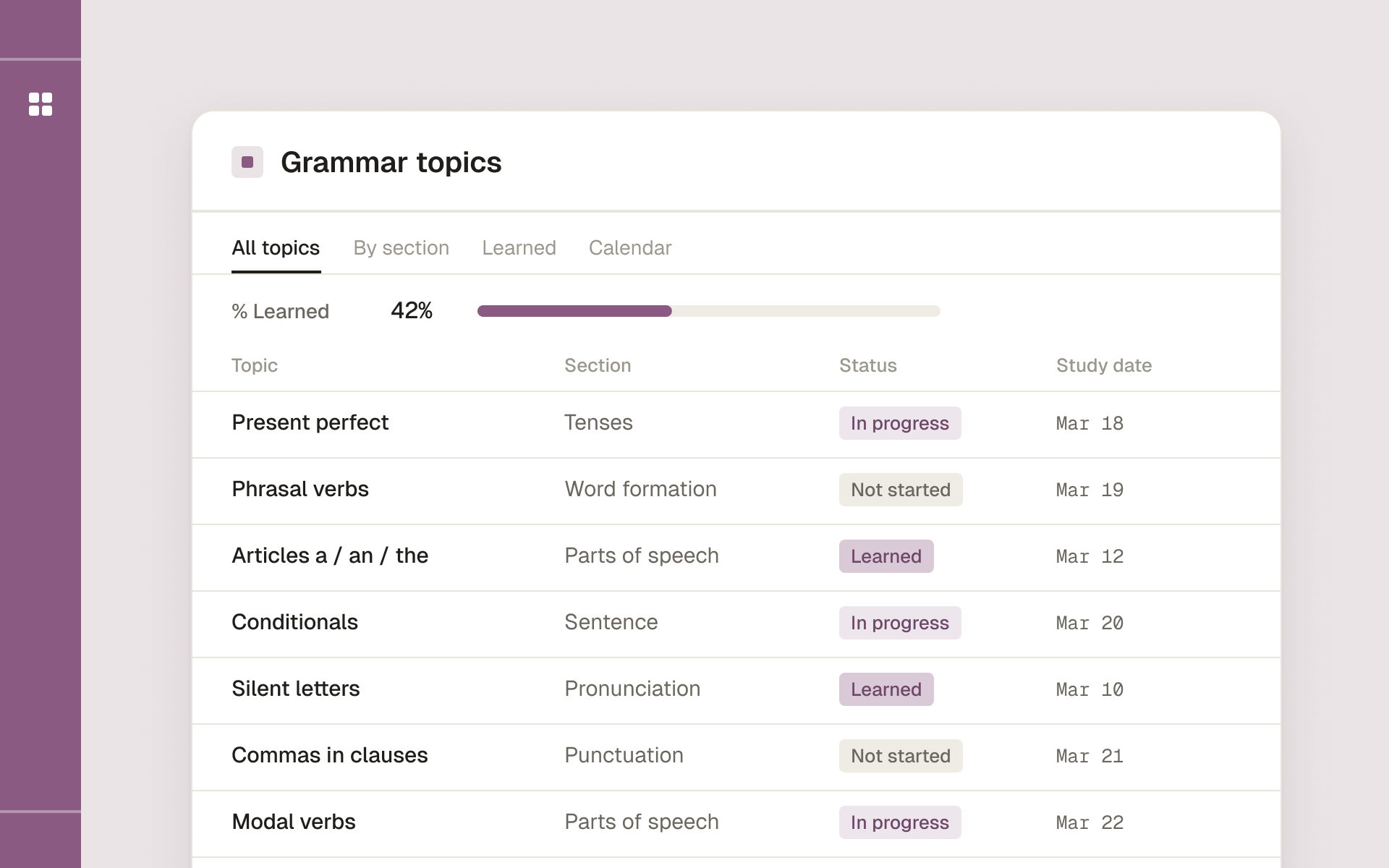
An ordered English grammar path in Notion, with explanations and exercises on each lesson page
Inside the English Grammar Study Planner
Here is what you get when you duplicate it, so you can decide before paying $9. You can also open the live preview and click through it yourself.
One database, 7 sections, 79 pages in a tree. About 50 of those pages are lessons; the rest are section and group pages that hold the tree together. The top level is Alphabet, Pronunciation, Word Formation, Parts of Speech, Tenses, Sentence and Punctuation. Each section opens into sub-items: Tenses, for example, splits into Past, Present and Future (each with its simple, continuous, perfect and perfect continuous forms, plus be going to), Conditional, Tenses Coordination and Passive Voice. Parts of Speech goes down to modal verbs, phrasal verbs, relative pronouns and comparatives. Coverage is uneven at the edges: Punctuation is a single (long) page of rules, and Alphabet is one page on letter names.
Five properties do the tracking:
- Status — Not started / In progress / Done.
- % Learned — a progress bar on each parent topic that fills as you mark its sub-topics Done.
- Study Date — when you plan to study it. Its description in the template notes it can be shown in Notion Calendar, so your grammar plan sits next to your other commitments.
- Section — for filtering, e.g. a view that shows only Tenses.
- Related pages — a place to link notes you already have elsewhere in your workspace.


The Grammar Tree ($5) is the opposite trade-off: the same seven-section structure, but the topic pages are blank for you to fill. It adds a Level property, «Study before / Study after» relations so you can chain topics in your own order, and three views — a table grouped by section, a gallery and a calendar. It suits teachers building material and learners of a language we don't have a planner for yet.

Let an AI tutor read your progress
Because the planner is an ordinary Notion database, an AI assistant can read it. Notion runs an official MCP server (Notion docs): connect it in an MCP-capable assistant such as Claude or ChatGPT, give it access to the planner, and it sees the same properties you do — Status, % Learned, Study Date and Section — plus the lesson pages themselves.
That turns a general chatbot into a tutor that knows where you are:
- «What should I study this week?» It looks for topics with this week's Study Date that are still Not started or In progress.
- «Quiz me on what I finished last week.» It picks the topics you marked Done and writes fresh questions in the style of the lesson pages.
- «Chat with me about my weekend, but make me use the Present Perfect.» It opens the lesson you are on and keeps the conversation to that grammar.
- «Which mistakes keep coming back?» If you keep the mistakes log from the setup below, it builds practice from the errors you actually make.
Two honest caveats. The assistant only knows what the database says, so the conversation is as good as your Status and Study Date columns are current. And edit access is your choice: you can let it mark a topic Done after a session, or keep it read-only and do the ticking yourself.
How to set up your English study system in Notion
You can build this in one evening. Start small; add pieces only when the first ones are part of your week.
- Name your goal and your weekly time. «Pass B2 by June, 4 hours a week» leads to a different setup than «feel less stuck in meetings». Write it at the top of your page.
- Pick one backbone. A grammar planner, an exam template or a hub — not all three. Duplicate it into your workspace.
- Choose your next 8 topics, not all of them. Give each a Study Date across the next four weeks. If you use a placement test, start from the first topics that felt shaky.
- Add a mistakes log. Create a small database with four properties: Mistake (title), Correction (text), Topic (relation to your grammar topics) and Seen again (checkbox). Every error from a tutor, a corrected email or a writing app goes here. Over a month it shows which three topics cause most of your trouble.
- Send vocabulary to Anki. Keep a short «new words» list in Notion if you like, but move anything you want to remember into Anki the same day. That is where the reviews happen.
- Connect the calendar. Add your database to Notion Calendar (it needs a date property), or add a Calendar view, so study sessions show up next to the rest of your week.
A weekly routine that fits in about 4 hours
Here is an illustrative week for someone with 30–45 minutes on weekdays. Adjust the minutes; keep the shape.
| Day | Focus | Time | Where |
|---|---|---|---|
| Mon | New grammar topic: read the theory and examples, do the first exercises | 40 min | Topic page, Status → In progress Notion |
| Tue | Anki reviews + 10 new words from last week's reading | 20 min | Anki Anki |
| Wed | Same topic: finish the exercises, check the answers, log mistakes | 40 min | Topic page + mistakes log Notion |
| Thu | Listening or reading, write down 5 useful phrases | 30 min | Podcast/article → Notion notes → Anki Practice |
| Fri | Speaking or writing that uses this week's topic | 30 min | Tutor, language partner or journal Practice |
| Sat | Anki reviews + fix three logged mistakes by rewriting the sentences | 30 min | Anki + mistakes log Anki |
| Sun | Weekly review: mark topics Done, date next week's topic, glance at % Learned | 15 min | Planner table Notion |
| Total | ≈ 3 h 25 min |
Pick your setup
| If you… | Use | Cost |
|---|---|---|
| mostly forget words | Anki, with a simple word list in Notion if you like | Freepaid on iOS |
| have an exam date | Learning IELTS (or your exam's template) + a mistakes log | Free |
| want a plan and motivation, have 1+ hour a day | English Learning Hub | Free |
| study English as one of several school subjects | Notion's Student Starter Pack | Free |
| keep repeating the same grammar mistakes | English Grammar Study Planner + mistakes log + Anki | $9 |
| teach, or learn a language other than English | Any language Grammar Tree | $5 |
| already use a textbook or course you like | Nothing new — add a Study Date column to your own list | Free |
When Notion is the wrong tool
If you enjoy building systems, Notion can become a hobby that replaces studying — you have redesigned your dashboard twice this month and done one exercise. If you are a beginner who needs a teacher's sequence, a course app or a class gives you more than any template. And if vocabulary is 80% of your problem, go straight to Anki and skip Notion for now.
A template earns its place only if you open it on an ordinary Tuesday. For more on keeping grammar reviews going, see our guide to spaced repetition for grammar in Notion and to tracking common English grammar mistakes. If you'd rather plan by calendar, the English grammar study schedule walks through a month-by-month plan. All our language templates live in the Languages category.
FAQ
Is there a free Notion template for learning English?
Yes. Notion's Marketplace lists many free language templates. English Learning Hub by Hailey Do is the most English-specific one we checked; Learning IELTS by Bennk covers exam prep.
Can Notion do spaced repetition?
Not natively. You can add a «next review» date and a filtered view, but you schedule reviews yourself. Anki schedules them automatically, which is why we recommend it for vocabulary.
Notion or Anki for language learning?
Both, for different jobs. Notion for planning, grammar notes and a mistakes log; Anki for remembering words and forms.
What's the best Notion study planner for students?
For general coursework, Notion's free Student Starter Pack. For English specifically, pair a planner with a subject template — a grammar planner or an exam template.
Do these templates work on the free Notion plan?
Our two grammar templates do, and the free Marketplace templates above are regular Notion pages you duplicate. Students with a school email may also qualify for Notion's free Education plan.
Can ChatGPT or Claude use my Notion study planner?
Yes, through Notion's MCP server (Notion docs). Once connected, the assistant reads Status, % Learned and Study Date, so it can plan your week, quiz you on finished topics and hold a conversation around the grammar you are studying now.
Can I use the English Grammar Study Planner for another language?
The explanations and exercises are English-only. For another language, use the Any language Grammar Tree and fill the topics in yourself.
Study English grammar topic by topic, with exercises and answer keys, and track what you have learned.