The hardest part of improving your English grammar alone isn't the rules — it's not knowing where you stand. You study for weeks and still can't answer the basic question: am I actually getting better, and at what? Progress feels invisible, so motivation fades. This is a Notion system that makes progress visible. It's the setup I'd hand to anyone serious about leveling up their grammar, built from a real workflow rather than a pretty template.
The case for tracking, not just studying
Most people "study grammar" the same way they study for an exam they keep postponing: a bit of reading here, an app there, no record of what stuck. The result is the illusion of progress without the substance.
Tracking flips that. When every grammar topic has a status and a confidence rating, and every mistake is logged, three things happen:
- You always know what to study next — the weakest topic, not a random one.
- You see progress accumulate, which is what actually sustains motivation.
- You catch your recurring errors, which are the ones holding your writing back.
The system below does all three with two databases and a handful of views.
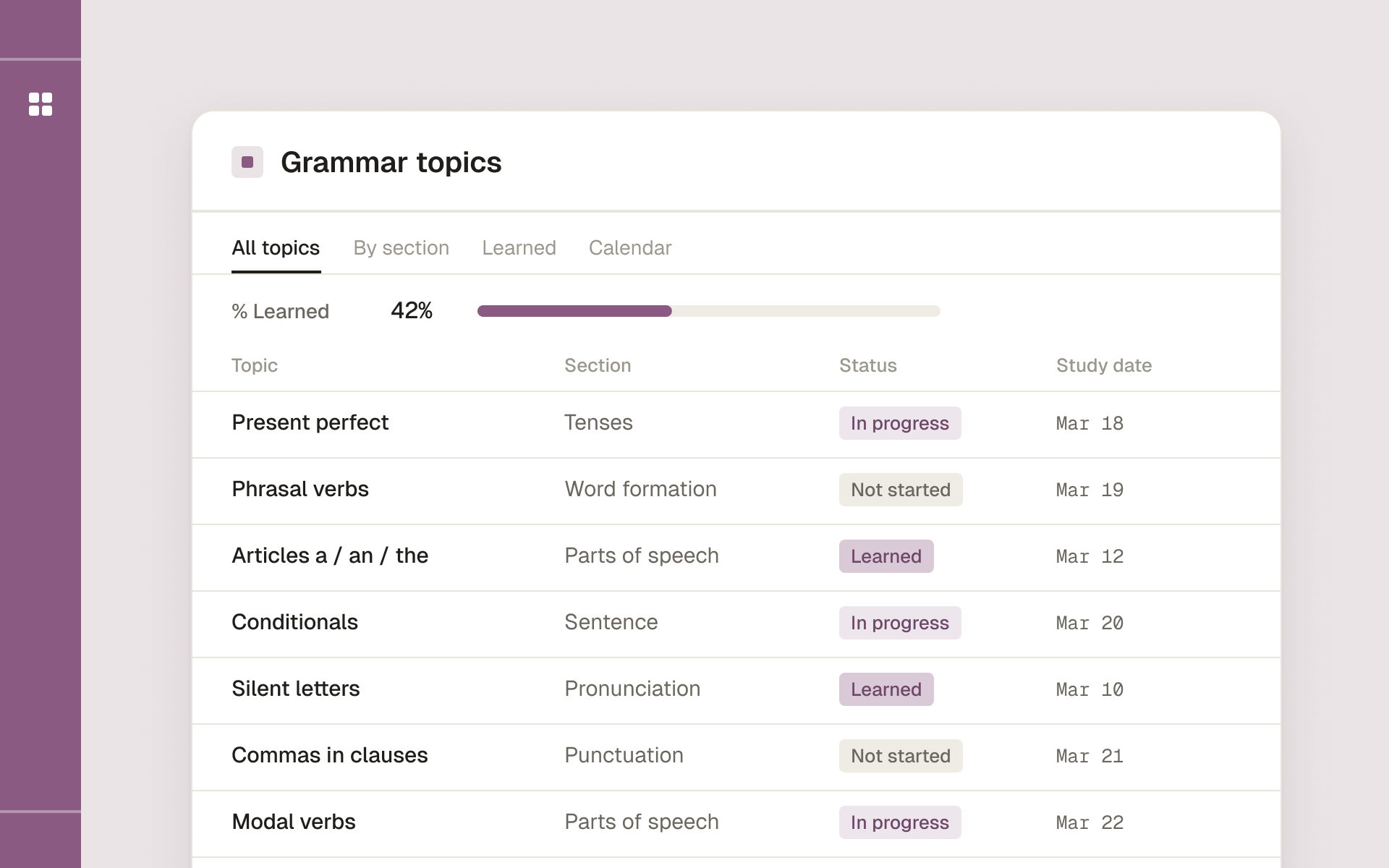
Database 1: Grammar Topics
This is your map of the territory. One row per grammar topic, with these properties:
- Topic (Title) — e.g. "Present perfect vs. past simple"
- Area (Select) — Tenses, Articles, Punctuation, Sentence structure, Word choice
- Confidence (Number, 1–5) — your honest self-rating
- Status (Select) — Not started / Learning / Reviewing / Solid
- Last studied (Date)
- Next review (Date)
- Notes (Text) — the rule in your own words, plus examples
Seed it with the topics relevant to your level — for most intermediate learners that's the tense system, articles, prepositions, conditionals, punctuation, and common confusions. Twenty to thirty topics is plenty to start.
Database 2: Mistakes Log
This is where progress gets specific. One row per mistake you actually make:
- Mistake (Title) — a short label
- Wrong version (Text) — what you wrote
- Correct version (Text) — the fix
- Topic (Relation → Grammar Topics) — link it to the topic it belongs to
- Times made (Number)
- Date logged (Date)
The relation to Grammar Topics is the key move. It connects your real errors to the topics you're tracking, so the two databases reinforce each other.
Wiring them together
On the Grammar Topics database, add a Rollup that counts linked mistakes from the Mistakes Log. Now each topic shows how many times you've actually stumbled on it. Sort topics by that count descending and you have a priority list driven by evidence, not vibes. The topic you think is your weakest is rarely the one the data points to.
The views that run the system
Study queue
A Grammar Topics view filtered to Status = "Learning" OR "Reviewing", sorted by Confidence ascending (then by mistake count). Open it and study from the top. No deliberation — the system already decided.
Due for review
Filtered to Next review on or before today. This is your spaced-repetition inbox. When a topic feels solid, push its review date out: one week, then two, then a month. If you stumble, reset it to three days. This single view keeps solid-feeling-but-fading topics from slipping away.
Progress board
A Board view grouped by Status. Watching topics move from "Learning" to "Reviewing" to "Solid" is the visible progress that self-study usually lacks. This board is the motivation engine — check it weekly and you'll feel the movement.
Top offenders
A Mistakes Log view sorted by Times made descending. Your three worst recurring errors live at the top. These deserve disproportionate attention because fixing one habit cleans up dozens of future sentences.
The weekly routine
The databases are the skeleton; the routine is the muscle. Fifteen minutes, once a week:
- Open Top offenders and read your top three recurring mistakes. For each, write one fresh correct sentence.
- Open Progress board and update any statuses that changed.
- Set or adjust Next review dates on topics you studied.
- Skim Due for review to plan the week's daily sessions.
Then daily, in 10 minutes: work the Study queue or Due for review, and log any mistake you catch into the Mistakes Log, linking it to its topic.
Honest ratings make or break it
The system's accuracy depends entirely on honest self-ratings. A Confidence of 5 should mean you applied the rule correctly, instantly, in your own writing — not that you recognized it in a multiple-choice quiz. If you hesitated, it's a 3. Inflated ratings quietly poison the study queue, sending you to drill things you've already got while your real weak spots hide. Rate the way you'd want a coach to rate you: a little harshly.
Why this works when apps don't
Grammar apps optimize for engagement — streaks, points, a next lesson chosen for you. They're fine for exposure, but they hide the map and keep you from seeing your own patterns. This Notion system does the opposite: it puts you in control of the map and surfaces your data. The mistakes log, in particular, gives you something no app will — a record of the specific errors you make and proof of the ones you've beaten.
Start small, let it grow
Don't build all of this in one sitting. This week:
- Create Grammar Topics and add the ten topics you most want to improve.
- Create the Mistakes Log and start logging errors, linking each to a topic.
- Add the Study queue and Top offenders views.
Add the rollup and the rest of the views next week, once you have data flowing in. Within a month you'll open Notion and know — at a glance, backed by your own numbers — exactly where your English grammar stands and what to do next. That clarity is the whole point. And if grammar is only one front of your English work, this tracker slots straight into the broader stack from our 10 best Notion templates for learning English — the grammar tracker and mistake log there follow the same design.
Study English grammar topic by topic, with exercises and answer keys, and track what you have learned.