Last updated: 11 October 2026 · By Zoya K
If you use ChatGPT or Claude at work, you already have a prompt library. It just lives in old chats and a doc called "good prompts". This guide turns it into a Notion database with a reusable prompt format and a test log, then shows how to make your best prompts into Notion skills.
What is an AI prompt library?
An AI prompt library is a collection of tested, reusable prompts organized so you can find and run them again instead of digging through chat history. Each entry records the use case, placeholders for the parts that change, the prompt itself and the output format it should produce. Good libraries also note which model each prompt was tested with.
A prompt library does three jobs:
- Consistency. The same task gets the same instructions every time, so results are comparable week to week.
- Reuse. You stop rewriting a prompt you already got right last month.
- Sharing. A teammate can run your tested prompt without asking you how you phrased it.
Are there free AI prompt libraries you can use?
Yes. Several universities publish free, well-structured prompt libraries, and they are a good place to borrow ideas and formats. They hold general prompts, though. Your own library holds prompts tuned to your work, tone and data, with notes on which model each one was tested with and when.
Two public libraries worth opening before you build your own:
- Wharton Generative AI Labs prompt library. It describes itself as "carefully designed and evidence-based prompt templates organized by purpose" (Wharton Generative AI Labs). Free to browse.
- USF Libraries AI prompt library. Every entry follows the same structure: a prompt name, a one-sentence use case, the models it works with, and the prompt itself with bracketed placeholders such as [TOPIC] (USF Libraries).
What public libraries can't give you is versioning and testing: whether a prompt still works after you switch models, and who fixes it. The schema below adds those fields.
How do you set up a prompt library database in Notion?
Create one Notion database with properties for name, use case, model tested, placeholders, prompt, output format, version, status, owner and last-tested date. Each prompt is a page, so the full prompt and example outputs live in the page body. Then add views such as "Ready to use", "Needs retest" and "By use case".
Here is the schema. It extends the USF fields (name, use case, models, prompt) with version, status and testing.
| Property | Type | What goes in it |
|---|---|---|
| Name | Title | Verb + object, e.g. "Summarize sales call notes". Descriptive titles matter for search and for AI tools. |
| Use case | Text | One sentence: when you run this prompt and for what result. |
| Model(s) tested | Multi-select | Claude, ChatGPT, Gemini, Notion AI. Only models you actually ran it on. |
| Inputs / placeholders | Text | The bracketed variables, e.g. [AUDIENCE], [PRODUCT], [TONE]. |
| Output format | Select | Bullets, table, email draft, JSON, outline. |
| Version | Number | 1, 2, 3. Bump it whenever the prompt text changes. |
| Status | Status | Draft, Tested, Retired. |
| Owner | Person | Who fixes the prompt when it drifts. Needed for shared libraries. |
| Last tested | Date | When you last ran it and checked the output. |
| Examples | Page body | One good output, pasted under the prompt, so you can spot drift later. |
Keep the prompt text in the page body, not in a property: bodies handle long text, code blocks and examples better.
Useful views:
- Ready to use: filter Status = Tested, sorted by Name.
- Needs retest: filter Last tested is before 90 days ago, or Status = Draft.
- By use case: board grouped by a Category select (writing, research, ops, sales).

How do you write a reusable prompt template?
Write each prompt with four parts: the goal, the inputs (placeholders in [BRACKETS]), the constraints, and the exact output format, for example "return 5 bullets". Then paste one good example output under it. The example is how you tell, months later, whether a model has started drifting from what you wanted.
Notion gives the same advice for skills: "Write your skill like a strong prompt, including the goal, inputs, constraints, and desired output format" (Notion Help Center). Prompts written this way become skills later without a rewrite.
Copy this card into each prompt page:
## Goal
[One sentence: what the output is for and who reads it.]

## Inputs
- [INPUT_1]: what to paste here
- [INPUT_2]: what to paste here

## Constraints
- Length: [e.g. under 150 words]
- Tone: [e.g. plain, no jargon]
- Do not: [e.g. invent numbers, add a greeting]

## Output format
[Exact shape, e.g. "5 bullets, each under 20 words" or "a table with columns X, Y, Z"]

## Example output (tested [DATE] with [MODEL])
[Paste one output you were happy with]
Two illustrations of the format for marketing and ops work. They are starting points to adapt, not tested recipes.
1. Call notes to action items
Goal: turn raw sales call notes into a follow-up list for the account owner.
Inputs: [CALL_NOTES], [CLIENT_NAME]
Constraints: only use facts in the notes; flag anything unclear with "(check)".
Output format: a table with columns Action, Owner, Due date; then 3 bullets of open questions.
2. Repurpose a blog post for LinkedIn
Goal: write one LinkedIn post that makes a single point from the article.
Inputs: [ARTICLE_TEXT], [AUDIENCE]
Constraints: 120-180 words; no hashtags in the body; one concrete example from the article.
Output format: the post, then 2 alternative first lines.
Use the same placeholder name for the same thing across prompts (always [AUDIENCE], never [READER] in one and [TARGET] in another), and list every placeholder in the Inputs property.
How do you turn your best prompts into Notion skills?
Notion skills are reusable instructions stored as Notion pages that Notion AI can run for a specific type of work. Mark a prompt page as a skill, or keep prompts in a skills database, where a Description field tells Notion Agent when to use each one automatically. Skills can also be downloaded as a SKILL.md file for local agents.
In Notion's words, "Skills are reusable instructions that teach Notion AI how to complete a specific type of work. They're written and maintained as Notion pages" (Notion Help Center). The help page gives a simple rule for which prompts qualify: "if you'd copy and paste the same prompt twice, it's a good candidate for a skill."
Three ways to do it, all from the same help page:
- One page. Open the prompt page, select ••• at the top, then select Use as a skill.
- A new skills database. "Every page you create in it becomes a skill automatically, and each skill gets a description property." The Description says what the skill does and when to use it.
- Your existing prompt library. Open the database settings, select More settings → Turn into, then Turn into Skills database.
The database route matters for automatic picking: "Automatic use only works for skills that live in a skills database, because that's where the skill description is stored." Write descriptions as triggers, for example "Use when the user pastes raw sales call notes and asks for next steps."
You can also run a skill by hand: highlight text, then choose the skill from the text selection menu.
Two more routes out of Notion:
- Custom Agents. "Any Custom Agent with access to a skill page can use it." Open the agent, go to Tools and access, and add the skill page. More on agents in the Notion Custom Agents guide.
- Local agents. Download to local agents saves the skill as a
SKILL.mdfile for tools "like Claude Code, Codex, Cursor, Gemini, or Grok", while the original page stays in Notion.
Skills run on Notion AI, and the help page does not say which plans include them, so check your workspace before planning a team rollout. The plain prompt database works with any AI app either way.

Can Claude or ChatGPT use your Notion prompt library?
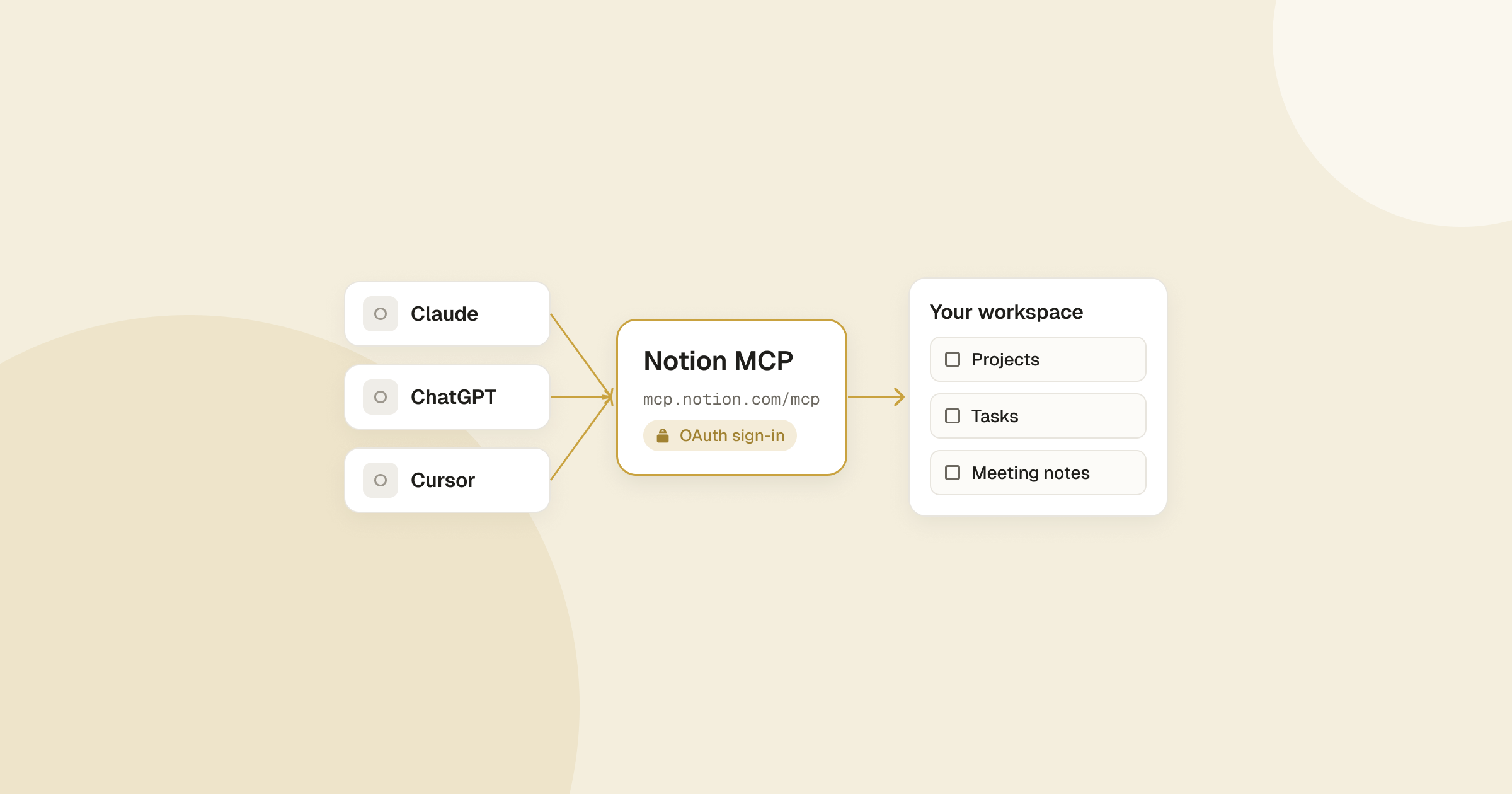
Yes. If your AI app connects to Notion through Notion MCP, it can search your workspace, fetch a prompt page by name and run it, so the library stays in Notion while you work in Claude or ChatGPT. Keep page titles descriptive, because Notion says AI apps rely on clear page titles to understand your content.
MCP (Model Context Protocol) is an open standard that lets AI apps use tools and data from other services. Notion lists Claude, ChatGPT Pro and Cursor among the apps that connect, and notes that "any AI app that supports the Model Context Protocol can connect to Notion" (Notion Help Center).
Once Notion is connected, ask: "Find the prompt 'Summarize sales call notes' in my Notion prompt library and run it on these notes." The app uses Notion's search and fetch tools to read the page, then follows the prompt.
The same connection can manage skills. Notion's MCP tool list includes notion-convert-page-to-skill, which "Marks a Notion page as a Notion Skill without changing its content", and notion-download-skill, which downloads a skill with its SKILL.md file (Notion Developers). The download tool needs the Skills API to be enabled.
This is where descriptive names pay off: a title like "Summarize sales call notes" is found; "Prompt v3 final" is not. For setup steps, see how to connect Claude to Notion with MCP.

How do you keep a prompt library up to date?
Re-test a prompt when you switch models or when its output drifts from the saved example. Record the test date and model, bump the version if you changed the text, and retire prompts nobody has used in months. In a shared library, give every prompt an owner, so a broken prompt has someone responsible for fixing it.
A short monthly routine is enough:
- Open the Needs retest view and run each prompt once with real input.
- Compare the output with the saved example. Same shape and quality: update Last tested. Different: fix the prompt, bump Version, paste the new example.
- When you change models, re-test everything in Ready to use and update Model(s) tested.
- Move prompts unused for 3 months to Retired instead of deleting them; the old version is a useful reference.
- Merge near-duplicates.
- Check owners. Reassign prompts whose owner left the team.
A hypothetical case: a marketing team keeps 40 prompts. After a model switch, the monthly pass finds 6 that now return paragraphs instead of the requested table. The fix is one tighter Output format line, a version bump and a new example.
If your prompts are steps inside larger processes, document them with the workflow they belong to. See where prompts fit in workflow documentation. For a wider setup that links prompts to notes and projects, read the AI second brain in Notion guide.

The AIkits Prompt Library template for Notion is coming soon. Join the waitlist above to hear when it's ready.
FAQ
How do I create an AI prompt library?
Create one database (Notion works well) with fields for name, use case, models tested, placeholders, output format, version, status, owner and last-tested date. Put each prompt in a page body using a goal, inputs, constraints and output format structure, plus one example output.
Is there a free library of AI prompts?
Yes. Wharton Generative AI Labs publishes a free library of evidence-based prompt templates organized by purpose, and USF Libraries keeps one for academic work. Save the versions you adapt in your own library.
What is the difference between a prompt and a Notion skill?
A prompt is text you paste into an AI tool. A Notion skill is a prompt saved as a Notion page that Notion AI can run on demand, from the text selection menu, or automatically when it lives in a skills database with a description.
Can I use Notion skills in Claude Code?
Yes. Use Download to local agents on the skill page, and Notion saves it as a SKILL.md file for local agents such as Claude Code, Codex or Cursor. The original page stays in Notion.
When should a prompt become a skill?
Notion's rule of thumb: if you'd copy and paste the same prompt twice, it's a good candidate for a skill.
Can Notion Custom Agents use my prompts?
Yes, if the prompt is a skill page and the agent has access to it. Open the Custom Agent, go to Tools and access, and add the skill page.